
NewThe AI course studio · from prompt to courseThe AI course studio
Courses that play like a film.
Turn a prompt, a document or a conversation into a finished course: directed scenes, narration, quizzes, practice and an AI tutor. Made by a crew of AI agents, approved by you, ready for your LMS.Turn a prompt, a document or a conversation into a finished course, made by a crew of AI agents and ready for your LMS.
Free for 14 days · No card needed · We keep your idea for your first course
One seedling, 4 designed looks






The film engine
Not slides. Scenes.
Every explaining scene is directed and filmed, and every shot is reviewed from its frames. Pick one of 15 visual styles or 4 designed looks, or let Coursento choose one for your subject.

What the film shows
A short film about Coursento, narrated by an AI voice. It shows how a course starts from an idea, a chat, a document or a YouTube link; the plan you approve; the storyboard being written and the lessons checked against your sources; pictures in the Glass Studio, Gouache, Swiss Kinetic and Field Notebook looks; courses for eight industries; quizzes, practice, the AI tutor and certificates; two lines of Arabic in an Egyptian and an Emirati AI voice; then changing one scene, publishing and exporting a SCORM package. Made with Coursento AI. Product screens are real, the handbook page, the pictures and the clips are samples, and people and places are fictional.
Timed to the voice
Every shot follows the narration word by word; in designed looks the voice-over is recorded first.
Drawn for this course
Pictures are made for each course, so every picture shares one look.
Reviewed before it ships
Every shot is written, checked in a real browser, reviewed from its frames and fixed.
Yours to direct
Ask for a calmer scene or a new example, by voice or text. Undo any edit; paid changes show their price first.
Use cases
Built for every team that has to teach.
Regulated, multilingual, always changing. Start from the policies, procedures and product docs you already have.

Banking and financial services
AML, fraud, conduct and cyber training.

Government and public sector
Upskill every public servant, Arabic-first.

Healthcare and hospitals
From new protocol to ward-ready team.

Technology and SaaS
Release training and product know-how, from your docs.

Manufacturing and industrial
Turn every SOP into a safety film.

Nonprofits and NGOs
Volunteer onboarding and safeguarding.
By need:
- Compliance
- Onboarding
- AI literacy
- Arabic and multilingual
Human in the loop
You're the executive producer.
The agents propose. You approve. Ask for changes by voice or text: they apply at once, with undo. Every paid change shows its price first, and nothing is published until you say so.
Approve the plan
Lessons, minutes, look and cost on one card.
Undo
Your last 10 edits, newest first.
Priced up front
A price on every paid change, and a monthly budget.
You publish
Review, then publish. Published versions never change.

Course guide
Done. The recap now comes before the check.
UndoAdd an AI presenter to lesson 1?Apply · 120 credits
Publish to
- SAP SuccessFactors, Moodle or any SCORM-compatible system
- cmi5
- Built-in xAPI store
- LTI 1.3 (beta)
- MP4 with captions
- YouTube
- Offline app
From prompt to course
Start with a sentence. Finish with a course.
Five stages. You decide at two of them, and you see the estimate in AI credits before the course is made.
01 · Brief
Say what people need to learn
Type it, upload your policy or deck, or talk it through. The course guide asks what it needs to know.
02 · Blueprint
Approve the plan and the cost
Every lesson, the look and the cost on one card. No lesson is written until you say yes.
03 · Lessons
An AI crew writes and reviews
Up to 6 lessons side by side, each checked against your sources, with practice and checks built in.
04 · Film
Every explaining scene directed and narrated
Drawn for this course, timed to the voice and checked in a real browser before learners see it. Every shot is also reviewed from its frames.
05 · Learners
Publish, track and improve
Learners take it in Coursento or your LMS. In Coursento you see progress, scores and certificates; SCORM and cmi5 report to your LMS.

The platform
A complete learning platform around the engine.
Learning paths, certificates, live classes, analytics and the offline app come with every plan. Only the add-ons depend on the plan.
Learning paths
Every planCourses in a set order or any order, with electives, prerequisites and recertification.
Certificates
Every planBranded and verifiable, in English or Arabic, with an expiry date when you need one.
Live classes
BetaCohorts, waitlists and attendance, with sessions on Coursento's meeting accounts or your own link.
Analytics
Every planWho finished, what stuck and where people stalled, with exports and scheduled reports.
Offline app
Every planInstalled from the browser: saved courses work offline, and progress syncs when the device is back online.
Add-ons
By planBudget, Course Kit, Gamification and HR sync (beta). The free trial includes them all.
English and Arabic, both directions
Right to left, right from the start.
Create natively in Arabic: narration, on-screen text, quizzes, certificates and the tutor, laid out right to left. Or create in English, French, Spanish or German and translate between 7 languages, re-voiced.
Create in 5 languages
English, Arabic, French, Spanish and German.
Translate between 7
Arabic, English, French, German, Spanish, Portuguese and Turkish. Each translation is a new course, re-voiced and re-animated.
Graded fairly in Arabic
Typed answers count the same with Arabic or Western digits, with or without diacritics, in any alef form.
Arabic certificates
Branded, verifiable, right to left.

What the clip shows
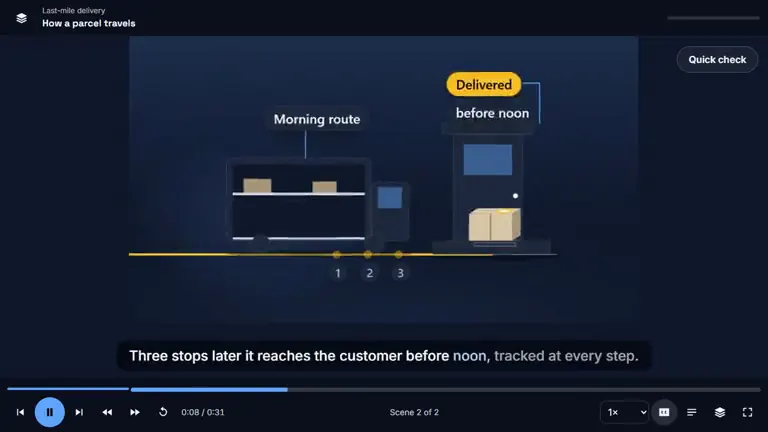
The lesson “كيف يسافر الطرد” (How a parcel travels) in the course player, right to left, with Arabic captions, in three parts. First, a hand-drawn picture titled “خطّط لمسار الصباح” (Plan the morning route) and labelled “فريق الإرسال” (Dispatch team): three team members trace a route on a city map, with boxes and a laptop on the table. Caption: “قبل أن تغادر أول شاحنة، يخطط فريق الإرسال لمسار الصباح معًا” (Before the first truck leaves, the dispatch team plans the morning route together). Then a whiteboard diagram, drawn step by step: a parcel leaves a warehouse labelled “المستودع” at nine o'clock, follows the morning route, “مسار الصباح”, past three numbered stops and reaches the customer's house, marked “تم التسليم” (delivered) and “قبل الظهر” (before noon). Captions: “يغادر الطرد المستودع في التاسعة وينضم إلى مسار الصباح” (The parcel leaves the warehouse at nine and joins the morning route) and “وبعد ثلاث محطات يصل إلى العميل قبل الظهر، متتبَّعًا في كل خطوة” (After three stops it reaches the customer before noon, tracked at every step). Last, a quick check, “متى يصل الطرد إلى العميل؟” (When does the parcel reach the customer?), with “في التاسعة” (at nine), “قبل الظهر” (before noon) and “في اليوم التالي” (the next day). “قبل الظهر” is chosen and marked “إجابة صحيحة” (correct): “يغادر في التاسعة، وبعد ثلاث محطات يصل قبل الظهر” (It leaves at nine and, after three stops, arrives before noon).
Watch it. Try it. Prove it.
Not just a video. A course, start to finish.
Every lesson has hands-on practice, tried out in a real browser, and a knowledge check, graded on Coursento's server when learners take it in Coursento. The AI tutor stays after the credits roll.
| What you get | A training video | A Coursento course |
|---|---|---|
| Narrated, animated scenes | ||
| Practice in every lesson | ||
| Knowledge checks, and a final exam in longer courses | ||
| An AI tutor that cites the scene | ||
| Tracked in your LMS (SCORM, cmi5) | ||
| Change one scene, keep the rest | ||
| Also exports as MP4 with captions |
The AI tutor works in Coursento, not inside SCORM or cmi5 packages or offline copies. SCORM packages check quiz answers inside the package unless you choose Coursento to check them; cmi5 packages always send answers to Coursento.
Practice · decision
A customer asks to withdraw $9,500 in cash, the third time this week.
What do you do next?
AI tutor
Structuring means splitting cash into amounts that stay under the reporting line. Three visits in one week is the pattern scene 4 showed.
Pricing
Clear plans. Prices on the page.
Plans pay for seats. AI credits pay for the AI work: making courses, narration and the AI tutor. One credit is one cent of AI work, and you see the estimate before a course starts.
Free trial
$0 for 14 days
- 25 seats, learners included
- AI credits to start
- Every feature and add-on to try
Starter
$8 per seat / month
- 1 to 100 seats
- SSO, SCIM, SCORM, cmi5 and xAPI
- AI credits from Coursento
Growth
$15 per seat / month
- 5 to 1,000 seats
- Everything in Starter
- Course Kit included
Enterprise
Custom pricing
- Learners don't use a seat
- Every add-on included
- Any number of staff seats
Prices are in US dollars, per seat per month. Every plan starts with the free trial.
SCORM or cmi5 packages in your LMS, or MP4 files, need no Coursento seats.
Built for trust
Courses learners want to open. Controls IT can approve.
From single sign-on to verifiable certificates, with plans and paid changes that wait for a person.
Single sign-on
SAML 2.0 or OpenID Connect, verified domains, optional enforcement.
Validation in progressSCIM 2.0
Provision and remove people automatically.
Validation in progressIsolated by design
Row-level security on every workspace table; an automated test fails if any table lacks it.
AI you approve
Plans and paid changes wait for a person; everything stays under your credits and monthly budget.
Sandboxed AI content
Interactive pieces run on a separate origin, away from your data.
Audit trail
Searchable and exportable, including changes approved through the assistant.
API and webhooks
Scoped keys, IP allowlists, signed events.
Privacy tools
Export or erase a person's data across the platform.
Fits the stack you already run.
Standards first, so courses travel.
- SCORM 1.2 and 2004 LMSsValidation in progress
- cmi5 LMSsValidation in progress
- xAPI record store, built in
- LTI 1.3 LMSsBeta
- SAML 2.0 / OpenID ConnectValidation in progress
- SCIM 2.0Validation in progress
- HR syncAdd-on · beta
- Slack updates
- Microsoft Teams updates
- Zoom, Teams and Meet classesBeta
- YouTubeBeta
- REST API and webhooks
YouTube (beta): uploads arrive private until Google approves Coursento.
Live classes (beta) run on Coursento's meeting accounts.
Coursento's proprietary agentic workflow
Your course has a crew now.
A director and a team of specialist AI agents plan, write, film, narrate and review every lesson. You decide at the moments that matter; code checks the work.
Course guide
Talks the brief through with you and proposes choices.
Course Director
Plans the course, assigns lessons, sends weak ones back.
Researcher
Researches the web where your sources leave gaps, and cites the pages it used.
Writers
Draft up to 6 lessons side by side.
Reviewers
Check each lesson against your sources.
Art director
Draws the course's pictures and keeps one look.
Film director and animator
Plans each lesson as one film and animates its scenes.
Interaction designer
Builds the practice and tries it out in a real browser.
Narrator
Records the AI voice-over, timed to every word.
AI presenter
Opens and closes each lesson, if you choose one.
Translator
Makes a translated copy of the course, re-voiced and re-animated.
AI tutor
Answers learners from the course, with sources.
- 48 AI tasks across the product
- Up to 6 lessons written side by side
- 51 automated checks for animated scenes
- 27 lesson components, 11 of them hands-on
FAQ
The questions L&D teams ask first.
Straight answers, from what the product does today.
Who makes sure it's right?
You approve the blueprint before any lesson is written, an AI reviewer checks each lesson against your sources, and nothing publishes until you do. For regulated topics, have your expert review the draft.
Do you train AI models on our content?
Coursento does not train AI models on your content.
Will it work with our LMS?
Coursento exports SCORM 1.2, SCORM 2004 and cmi5 packages for your LMS, with validation in progress, and connects over LTI 1.3 in beta. Packages and MP4 files need no Coursento seats. Or deliver the course inside Coursento.
What does a course cost?
It depends on its length, its style and your edits. One AI credit is one cent of AI work. Before a course is made, you see its estimate in AI credits and approve it, and every paid change after that shows its price first.
How good is the Arabic?
A course you create in Arabic is written in Arabic from the start, not translated: narration, on-screen text, quizzes, certificates and the AI tutor, laid out right to left. Typed answers count the same with Arabic or Western digits, diacritics or any alef form, and the app itself is in English and Arabic.
Do you have SOC 2 or ISO 27001?
Not yet. Coursento holds no certifications today, and we answer security questionnaires.
Your first course is one sentence away.
Free for 14 days, with AI credits to start. No card needed.